Crystal structure prediction of a Co-crystal
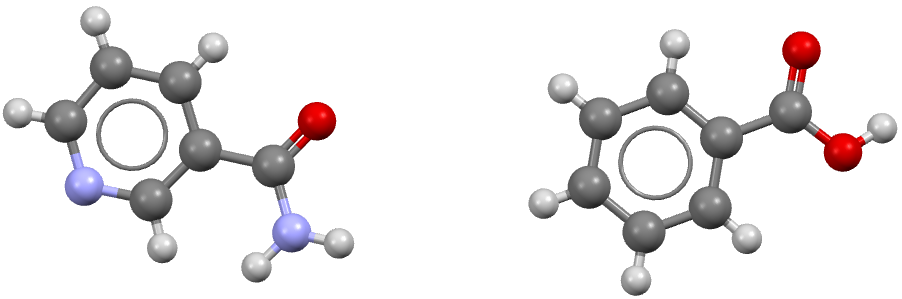
In this example we will show how to perform a CSP simulation for a 1:1 co-crystal of nicotinamide and benzoic acid (refcode: GAZCES)
Step 1: Obtain a geometry file for each component
Typically these should be optimized gas phase conformations, from a program like Gaussian or otherwise.
For more information, please see the Crystal structure prediction of Acetic acid example.
Step 2: Perform distributed multipole analysis
Assuming a simple naming scheme has been used for the geometry files, the distributed multipole analysis for the 1:1 co-crystal is performed with the following command:
cspy-dma nicotinamide.xyz benzoic_acid.xyz
This will produce the following files:
nicotinamide.benzoic_acid.mols         # molecular axis definition (NEIGHCRYS/DMACRYS) format
nicotinamide.benzoic_acid.dma          # molecular multipoles
nicotinamide.benzoic_acid_rank0dma    # molecular charges in the same format (probably from MULFIT or similar)
Other stoichoiometric ratios can also be calculated. For example, a generic 2:1 co-crystal would be specified as follows:
cspy-dma component_1.xyz component_1.xyz component_2.xyz
This will produce the following files:
component_1x2.component_2.mols         # molecular axis definition (NEIGHCRYS/DMACRYS) format
component_1x2.component_2.dma          # molecular multipoles
component_1x2.component_2_rank0.dma    # molecular charges in the same format (probably from MULFIT or similar)
Step 3: Perform crystal structure prediction
To perform a local CSP calculation for the 1:1 co-crystal of nicotinamide and benzoic acid, (sampling the top ten most commonly observed spacegroups for co-crystals) the following command can be used:
mpiexec -np NUM_CORES cspy-csp nicotinamide.xyz benzoic_acid.xyz -c nicotinamide.benzoic_acid_rank0dma -m nicotinamide.benzoic_acid.dma -a nicotinamide.benzoic_acid.mols -g co_crystalfine
Where NUM_CORES refers to the number of CPU cores you wish to run the calculation with. One of these will be the controller
and the rest will be worker cores that perform structure generation and minimization tasks. This command can also be
incoprorated into a job submission script and used on a HPC facility. An example SLURM submission script for acetic acid is
given below:
#!/bin/bash
#SBATCH --nodes=5
#SBATCH --ntasks-per-node=40
#SBATCH --time=24:00:00

cd $SLURM_SUBMIT_DIR

module load conda/py3-latest
source activate cspy
mpiexec cspy-csp nicotinamide.xyz benzoic_acid.xyz -c nicotinamide.benzoic_acid_rank0dma -m nicotinamide.benzoic_acid.dma -a nicotinamide.benzoic_acid.mols -g co_crystalfine
Step 4: Remove duplicate structures
The database files that are output in step 3 will likely contain many duplicate structures. These arise in situations where the structure generator creates a number of structures that optimize into the same minimum on the force-field potential energy surface. We can remove duplicate structures using the following command:
cspy-db cluster *.db
This will find redundant structures within each of the database files, combine the unique structures into a new database file (defaulting to
output.db), then find unique structures within the combined file (i.e. search for duplicates across the different spacegroups).
Step 5: Analyse the Landscape
Once you have removed duplicate structures you can use the final database to analyse the results. The following command can be used to create a csv file of the final structures ordered by energy (default). Each structure will also be saved to a compressed archive in shelx format by default.
usage: cspy-db dump [-h] [-t TABLE_OUTPUT] [-r STRUCTURE_OUTPUT] [-f {cif,res}] [-d] [-e ENERGY] [--parse-metadata] [-s SORT_BY]
           [--log-level {INFO,DEBUG,ERROR,WARN}]
           databases [databases ...]
positional arguments
databases- Databases to process.
optional arguments
-h,--help- Show this help message and exit-tTABLE_OUTPUT,--table-outputTABLE_OUTPUT- Name of .csv output file-rSTRUCTURE_OUTPUT,--structure-outputSTRUCTURE_OUTPUT- Name of .zip output file-f{cif,res},--structure-filetype {cif,res}- File type for compressed structures-d,--include-duplicates- Dump duplicate structures also-eENERGY,--energyENERGY- Dump structures that are a within the inputted energy from the global minimum--parse-metadata- Include metadata-sSORT_BY,--sort-bySORT_BY- Sort by a specified column (id, spacegroup, density, energy, minimization_step, trial_number, minimization_time, metadata)--log-level{INFO,DEBUG,ERROR,WARN}- Control level of logging output
We have provided some example python scripts in the Useful Scripts section which can be used to visualise the landscape.