Quasi-random basin hopping (QRBH) simulation of benzamide
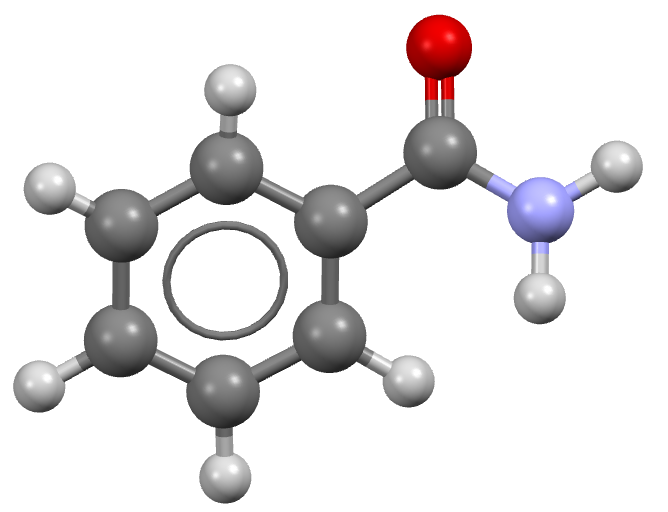
Step 1: Obtain a geometry file for benzamide
Typically these should be optimized gas phase conformations, from a program like Gaussian or otherwise.
For more information, please see the Crystal structure prediction of Acetic acid example.
Step 2: Perform distributed multipole analysis
The distributed multipole analysis can be performed as follows:
cspy-dma benzamide.xyz
This will produce the following files:
benzamide.mols         # molecular axis definition (NEIGHCRYS/DMACRYS) format
benzamide.dma          # molecular multipoles
benzamide_rank0.dma    # molecular charges in the same format (probably from MULFIT or similar)
Step 3: Configure the TOML file
In order for the cspy-qrbh command to receive settings for the monte-carlo basin hopping,
the user must supply a cspy.toml file such as the one below:
[mc]
initial_temper = 3000.0            # Temperature for basin hopping
num_steps = 100                    # Number of maximum steps for one basin hopping trial (infinite with continue_running=True)
num_trials = 500                   # Number of basin hopping trials
sat_expand = false                 # Whether to use SAT to expand the cell after perturbation
move_all = false                   # Whether to apply all available types of move at one perturbation
auto_prob = true                   # Calculate probability of choosing move type according to degrees of freedom
continue_running = false           # If True, trial will keep running even after finishing
auto_cutoff = true                 # Calculate cutoff of move type, currently only applied to volume expansion and contraction based on number of molecules in unit cell
on_the_fly = true                  # Whether to use on-the-fly duplicate structure removal, if True, continue_running will always be False
move = [
    [ "tra", "0.0", "4",],
    [ "rot", "0.0", "0.4",],
    [ "u_a", "0.0", "4",],
    [ "u_l", "0.0", "4",],
    [ "vol", "0.0", "80",],]       # Specifies the type of pertubations

[basin_hopping]
basin_hopping = true               # Minimize after perturbation, meaningless here
dump_accept = true                 # Only dump accepted structures if True
raw_structure = true               # Perturb from unminimized structure if True
niggli_cell = true                 # Calculate Niggli cell after pertubation
The move parameter is used to specify the types of pertubations that may be selected during the Monte Carlo simulation.
Its input is a list of lists where each sublist contains: the move type (tra = molecule translation,
rot = molecule rotation, u_a = unit cell angle change, u_l = unit cell length change, vol = unit cell volume change,
ref = reflect a molecule through a plane), the move choice probability, and the cut-off value i.e. the maximum magnitude possible
for that move. If the move choice probabilities are 0 or auto_prob is true, then the probabilities will be calculated as the proportion
of the total degrees of freedom.
Step 4: Perform the QRBH simulation
To perform a local QRBH calculation for benzamide, (sampling the top ten most commonly observed spacegroups) the following command can be used:
mpiexec -np NUM_CORES cspy-qrbh benzamide.xyz -c benzamide_rank0.dma -m benzamide.dma -a benzamide.mols -g fine10
Where NUM_CORES refers to the number of CPU cores you wish to run the calculation with. This command can also be
incoprorated into a job submission script and used on a HPC facility. An example SLURM submission script is given below:
#!/bin/bash
#SBATCH --nodes=5
#SBATCH --ntasks-per-node=40
#SBATCH --time=24:00:00

cd $SLURM_SUBMIT_DIR

module load conda/py3-latest
source activate cspy
mpiexec cspy-qrbh benzamide.xyz -c benzamide_rank0.dma -m benzamide.dma -a benzamide.mols -g fine10
Once the calculation begins, a set of SQL databases will appear in the working directory. There will be one per spacegroup
and will have the following naming scheme: benzamide-SG.db (SG replaced with the spacegroup number)
There will also be a status.txt file. Below is an example shown from a test simulation involving a single space group:
  target valid qr_fail invalid  seed running       ttime      mtime valid_min invalid_min unique_min target_trial active_trial truncate_trial finish_trial
9  10000  2768    5420    5602  8371       0  1093710.68  595800.09     10289         549       6884          500          166           2602            0

39 MPI workers. ETA: 0d 20h 21m 10s
1st column is the spacegroup number
targetis the number of valid structures that were requestedvalidis the number of valid structures that have been obtained by the quasi-random crystal structure generation stepqr_failis the number of trial crystal structures that failed the quasi-random crystal structure generation stepinvalidnumber of trial crystal structures that passed the quasi-random crystal structure generation step but failed the subsequent minimization step.seedis the maximum sobol seed that has been used so farrunningis the number of active tasks in the work queuettimeis the total amount of time in seconds that the workers have spent on quasi-random crystal structure generation and structure minimzation tasksmtimeis the total amount of tie in seconds that the workers have spent on successful structure minimization tasksvalid_minis the number of valid structures that have been minimized after quasi-random structure generation and basin hopping monte carlo simulationsinvalid_minis the number of structures that have failed to geometry optimize after the basin hopping monte carlo simulationunique_minis the number of unique minima which are found by performing on-the-fly clustering after basin hopping monte carlo simulations.target_trialis the number of basin hopping trials that was requested in thecspy.tomlfileactive_trialis the number of basin hopping trials that are currently runningtruncate_trialis the number of basin hopping trials that were truncated before completion (this can occur if a duplicate structure is found by on-the-fly clustering)finish_trialis the number of basin hopping trials that are complete
Note
Quasi-random generated structures will be found first and then basin hopping trajectories are run from these.
valid in the 2nd column shows the number of Quasi-random generated structures where as valid_min shows
the number of structrues generated from the quasi-random step and basin hopping step. Therefore, valid can
truncate_trial + finish_trial + active_trial
Step 5: Remove duplicate structures
The database files that are output in step 4 will likely contain many duplicate structures. We can remove duplicate structures using the following command:
cspy-db cluster *.db
This will find redundant structures within each of the database files, combine the unique structures into a new database file (defaulting to
output.db), then find unique structures within the combined file (i.e. search for duplicates across the different spacegroups).
Step 6: Analyse the Landscape
Once you have removed duplicate structures you can use the final database to analyse the results. The following command can be used to create a csv file of the final structures ordered by energy (default). Each structure will also be saved to a compressed archive in shelx format by default.
usage: cspy-db dump [-h] [-t TABLE_OUTPUT] [-r STRUCTURE_OUTPUT] [-f {cif,res}] [-d] [-e ENERGY] [--parse-metadata] [-s SORT_BY]
           [--log-level {INFO,DEBUG,ERROR,WARN}]
           databases [databases ...]
positional arguments
databases- Databases to process.
optional arguments
-h,--help- Show this help message and exit-tTABLE_OUTPUT,--table-outputTABLE_OUTPUT- Name of .csv output file-rSTRUCTURE_OUTPUT,--structure-outputSTRUCTURE_OUTPUT- Name of .zip output file-f{cif,res},--structure-filetype {cif,res}- File type for compressed structures-d,--include-duplicates- Dump duplicate structures also-eENERGY,--energyENERGY- Dump structures that are a within the inputted energy from the global minimum--parse-metadata- Include metadata-sSORT_BY,--sort-bySORT_BY- Sort by a specified column (id, spacegroup, density, energy, minimization_step, trial_number, minimization_time, metadata)--log-level{INFO,DEBUG,ERROR,WARN}- Control level of logging output
We have provided some example python scripts in the Useful Scripts section which can be used to visualise the landscape.