Threshold simulation for Benzene
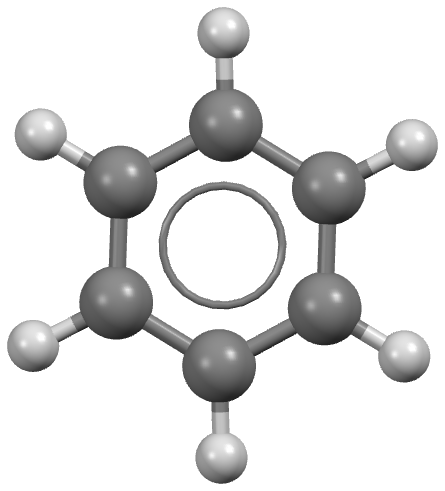
Step 1: Obtain a geometry file for Benzene
Typically these should be optimized gas phase conformations, from a program like Gaussian or otherwise.
For more information, please see the Crystal structure prediction of Acetic acid example.
Step 2: Perform distributed multipole analysis
The distributed multipole analysis can be performed as follows:
cspy-dma benzene.xyz
This will produce the following files:
benzene.mols         # molecular axis definition (NEIGHCRYS/DMACRYS) format
benzene.dma          # molecular multipoles
benzene_rank0.dma    # molecular charges in the same format (probably from MULFIT or similar)
Step 3: Configure the TOML file
Below is an example contents of the cspy.toml file for this simulation.
csp_minimization_step = [
{ kind = "dmacrys", electrostatics = "multipoles" },
{ kind = "dmacrys", CONP = true, PRES = "0.1 GPa", electrostatics = "multipoles"},
{ kind = "dmacrys", electrostatics = "multipoles" },
]

[mc]
num_steps = 100
move = [
    [ "tra", "0.0", "0.5"],
    [ "rot", "0.0", "0.05"],
    [ "u_a", "0.0", "0.5"],
    [ "u_l", "0.0", "0.5"],
    [ "vol", "0.0", "25"]
]
move_scale = 1.0
move_all = false
auto_prob = true
auto_cutoff = true

[basin_hopping]
dump_accept = false

[threshold]
interval_para = [ "fixed", "10", ]
increase_para = [ "fixed", "5.0", ]
minimize = true

[dmacrys]
timeout = 200.0
[csp_minimization_step] - This section contains a list of dictionaries which individually describe a minimization step. In the above example,
there are three lattice energy minimzation steps performed by DMACRYS. All steps use an anisotropic atom–atom force-field energy model
plus electrostatic interactions described by a multipole series (up to hexadecapole) using distributed multipole analysis. The difference in step 2
from the other steps is that an external pressure of 0.1 GPa is applied.
[mc] & [basin hopping] - These sections contain settings for the Monte Carlo simulation that are used in both threhold and QRBH simulations.
num_steps is the total length of the simulation is 100 steps (accepted and rejected). move is used to define the moveset by a list of lists
with each sublist specifying a movetype and its parameters. The first param of a move is its type, the available types are: molecular translation (tra),
molecular rotation (rot), unit cell angles (u_a), unit cell lengths (u_l), and unit cell volume (vol). The second parameter is the
selection probability. If the probabilities are 0 or auto_prob is true then the probabilities will be calculated as the proportion of the total degrees of freedom.
The third parameter is the cutoff for the move, i.e. the maximum magnitude possible for that move. The units for each move are as follows: translation is Å,
rotation is degrees, volume is Å^{3}. The auto_cutoff option scales the volume cutoff based on the number of molecules in the unit cell.
move_scale scales the cutoffs by a scalar each time the energy lid is increased. move_all is used to specify whether to apply all available types of move
at one perturbation or to apply each move as a single pertubation. Finally, the dump_accept keyword in the [basin_hopping] section is used to
only dump accepted structures if set to true.
[threhold] - This section is used to set the energy threhold and steps per lid. Here, interval_para is the number of steps per energy threshold/lid.
The first parameter specifies the type strategy, e.g. fixed means same number of steps each energy lid. Likewise, increase_para is the energy increase
between energy thresholds, e.g. increases 5.0 kJ/mol each iteration. Again the first parameter determines the strategy. The total number of lids is determined
by dividing the num_steps by the interval_para steps. The minimize option sets whether to do the minimization of the accepted structures concurrently. If
running many trajectories, it can be more efficient to just do the MC trajectories by themselves using 1 core per trajectory and then do the optimizations
afterwards using large scale parallelisation (e.g. using cspy-reoptimize). Minimizing the accepted structures is essential since this is how we determine
what minima are sampled during the trajectory. Typically, we want the same energy surface throughout, i.e. the minimization steps in the cspy.toml should
be the same (though including a pressure step is good since high energy structures sampled during the threshold simulation can often exhibit vacuum gaps between layers).
[dmacrys] - This section is used to specify settings for the DMACRYS program. In this example, it is used to modify the timeout which
tells DMACRYS how long to perform a calculation before stopping and moving on to another calculation.
Step 4: Obtaining a starting crystal structure of benzene
The threshold algorithm is usually initiated several local minima on the energy landscape and therefore requires input crystal structures for benzene.
In this example, we demonstrate using a single crystal structure - benzene_form_III_csp_P1.res corresponding to the high pressure form III polymorph
of benzene as found after performing crystal structure prediction. It is important that the initial crystal structures are converted to P1 symmetry.
This can be achieved with the following python script:
from cspy.crystal import Crystal
import sys

crystal = Crystal.load(sys.argv[1])
p1_crystal = crystal.as_P1()
p1_crystal.save(sys.argv[2])
The python script is then run on the command line:
python SCRIPT.py input_structure output_structure
Where input_structure is the input SHELX or CIF crystal structure and output_structure is the filename you want to save the P1 structure to. The file extension
used on output_structure will dictate the type of file that is written (i.e. .res will be a SHELX file and .cif will be a CIF file.)
Below is the file contents of benzene_form_III_csp_P1.res.
TITL benzene_form_III_csp-P1-1-1-1
CELL 0.7 8.0828 5.5371 5.6702 90 71.6477 90
LATT -1
SFAC C H
C1    1       0.742101910000       0.332654780000       0.330318380000
C2    1       0.640453210000       0.312381590000       0.578596760000
C3    1       0.851634060000       0.531097440000       0.251713210000
C4    1       0.648362810000       0.490526050000       0.748280230000
C5    1       0.859550100000       0.709251950000       0.421390990000
C6    1       0.757901400000       0.688978750000       0.669669360000
H1    2       0.735965720000       0.194028970000       0.198294610000
H2    2       0.555227380000       0.158003620000       0.639830350000
H3    2       0.930733010000       0.546864180000       0.058529300000
H4    2       0.569263860000       0.474759320000       0.941464150000
H5    2       0.944775480000       0.863618510000       0.360178410000
H6    2       0.764036190000       0.827588620000       0.801697560000
C7    1       0.257898090000       0.832654780000       0.669681620000
C8    1       0.359546790000       0.812381590000       0.421403240000
C9    1       0.148365940000       1.031097440000       0.748286790000
C10   1       0.351637190000       0.990526050000       0.251719770000
C11   1       0.140449900000       1.209251950000       0.578609010000
C12   1       0.242098600000       1.188978750000       0.330330640000
H7    2       0.264034280000       0.694028970000       0.801705390000
H8    2       0.444772620000       0.658003620000       0.360169650000
H9    2       0.069266990000       1.046864180000       0.941470700000
H10   2       0.430736140000       0.974759320000       0.058535850000
H11   2       0.055224520000       1.363618510000       0.639821590000
H12   2       0.235963810000       1.327588620000       0.198302440000
Step 5: Running the threshold calculation
The threshold calculation can be run on a SLURM cluster with the following script:
#!/bin/bash
#SBATCH --nodes=5
#SBATCH --ntasks-per-node=40
#SBATCH --time=24:00:00

cd $SLURM_SUBMIT_DIR

source ~/.bashrc
conda activate cspy
mpiexec cspy-threshold benzene.xyz -r  benzene_form_III_csp_P1.res -a benzenex2.mols -m benzenex2.dma -c benzenex2_rank0.dma  -g 1 --trials-per-res 1
Note
A space group flag (-g) is currently required, however, this does not actually determine
the space group sampled (that is determined by the space group of the
crystal files). This flag simply determines the space group label in the
structure ids.
Generally, all threshold simulations should be done in P1 since any space group symmetry
represents a constraint on the transitions that can be sampled and so
leads to overestimating the lowest energy connection, i.e. remember to
convert your crystals to P1 before running threshold simulations.
For convergence, it can be useful to have multiple trajectories/trials
per structure. This is set with the --trials-per-res option.
This will produce a database file benzene-1.db which stores crystal structures from the threshold simulation
and status.txt. The contents of status.txt looks similar to this at the beginning of the simulation:
  target perturb accept reject valid invalid running target_trial active_trial finish_trial unique_min ttime mtime
1    100       1      0      1     1       0       0            1            1            0          0  9.84  8.42
target- The requested number of simulation stepsperturb- The number of pertubations that have been carried outaccept- The number of accepted pertubationsreject- The number of rejected pertubationsvalid- The number of valid optimisationsinvalid- The number of invalid optimisationsrunning- The number of running jobs (currently always reads 0 but iwll be fixed in next update)target_trial- The requested number of trials/trajectoriesactive_trial- The number of running trials/trajectoriesfinish_trial- The number of complete trials/trajectoriesunique_min- The number of unique structuresttime- The total timemtime- The minimization time
Step 6: Generating the Disconnectivity Graph
Firstly, the output database (benzene-1.db) must be clustered.
cspy-db cluster benzene-1.db
If the user has access to the CSD python API, we recommend following this up with COMPACK clustering.
cspy-db cluster -cfe -m compack benzene-1.db
The disconnectivity graph is then generated using the cspy-threshold-utils command:
cspy-threshold-utils disconn benzene-1.db
The script is ran on the clustered original database (NOT the output database! this does not contain the trajectory information and so will not work).